
Ford Escape 2020-2026 Owners Manual / Starting and Stopping the Engine / Ignition Switch
Ford Escape: Starting and Stopping the Engine / Ignition Switch
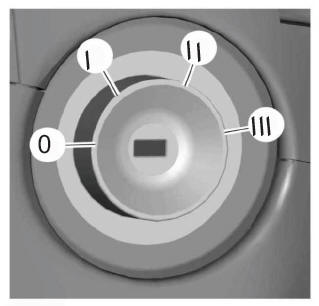
Switching the Ignition Off
Turn the key to position 0.
Switching the Ignition to Accessory Mode
Turn the key to position I. Electrical accessories, for example the radio, operate without the engine running.
Switching the Ignition On
Turn the key to position II. All electrical circuits and accessories are operational and the warning lamps and indicators illuminate.
Starting the Engine
Turn the key to position III. Release the key when the engine starts.
 Starting and Stopping the Engine – Precautions
WARNING: Extended idling at high
engine speeds can produce very high
temperatures in the engine and exhaust
system, creating the risk of fire or other
damage...
 Push Button Ignition Switch
Switching the Ignition Off
When the ignition is on or in accessory
mode, press the push button ignition
switch once without your foot on the brake
pedal...
Other information:
Ford Escape 2020-2026 Owners Manual: Mobile Device Data
If you connect a mobile device to your vehicle, you can display data from your device on the touchscreen for example, music and album art. You can share your vehicle data with mobile apps on your device through the system. The mobile apps function operates by your connected device sending data to us in the United States...
Ford Escape 2020-2026 Service Manual: Removal and Installation - Block Heater
Removal NOTE: Removal steps in this procedure may contain installation details. Drain the cooling system. Refer to: Engine Cooling System Draining, Vacuum Filling and Bleeding (303-03C Engine Cooling, General Procedures). Remove the catalytic converter...
Categories
- Manuals Home
- 4th Generation Ford Escape Owners Manual
- 4th Generation Ford Escape Service Manual
- Plug-In Hybrid Electric Vehicle Drive Modes
- Fuel Quality
- Description and Operation - Identification Codes
- New on site
- Most important about car
Fastening the Seatbelts

Copyright © 2026 www.fordescape4.com