Ford Escape: Liftgate - Vehicles With: Power Liftgate / Setting the Liftgate Opening Height
- Open the liftgate.
- Stop the liftgate movement by pressing
the control button on the liftgate when
it reaches the desired height.
Note: Once the liftgate stops moving, you can manually move it to the desired height.
- Press and hold the control button on
the liftgate until a tone sounds,
indicating programming is complete.
Note: You can only use the liftgate control button to program the height.
Note: You cannot program the height if the liftgate position is too low.
- The power liftgate now opens at the
programmed height. To change the
programmed height, repeat the steps.
Note: You can fully open the liftgate by manually pushing it upward to the maximum open position if it opens in a lower position.
Note: The system recalls the new programmed height until you reprogram it, even if you disconnect the battery.
 Opening the Liftgate
Opening the Liftgate From Inside Your Vehicle
With the transmission in park
(P), press the button on the
instrument panel.
Note: Be careful when opening or closing
the liftgate in a garage or other enclosed
area to avoid damaging the liftgate...
 Closing the Liftgate
Closing the Liftgate From Inside Your Vehicle
WARNING: Make sure all persons
are clear of the power liftgate area
before using the power liftgate control...
Other information:
Ford Escape 2020-2026 Owners Manual: Automatic Return to Park (P)
What Is Automatic Return to Park (P) Your vehicle shifts into park (P) if you attempt to exit your vehicle without the transmission in park (P). How Does Automatic Return to Park (P) Work Your vehicle shifts into park (P) when your vehicle is stationary and any of the following occur: You switch the vehicle off...
Ford Escape 2020-2026 Service Manual: Removal and Installation - High Voltage High Current Fuse - Hybrid Electric Vehicle (HEV)
Removal WARNING: To prevent the risk of high-voltage shock, always follow precisely all warnings and service instructions, including instructions to depower the system. The high-voltage system utilizes approximately 450 volts DC, provided through high-voltage cables to its components and modules...
Categories
- Manuals Home
- 4th Generation Ford Escape Owners Manual
- 4th Generation Ford Escape Service Manual
- Opening and Closing the Hood
- Plug-In Hybrid Electric Vehicle Drive Modes
- Removal and Installation - All-Wheel Drive (AWD) Module - 1.5L EcoBoost (132kW/180PS) – I3 (Y1)/2.0L EcoBoost (177kW/240PS) – MI4
- New on site
- Most important about car
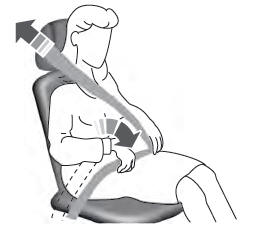
Adjusting the Seatbelts During Pregnancy
WARNING: Always ride and drive with your seatback upright and properly fasten your seatbelt. Fit the lap portion of the seatbelt snugly and low across the hips. Position the shoulder portion of the seatbelt across your chest. Pregnant women must follow this practice. See the following figure.