
Ford Escape 2020-2026 Owners Manual / Automatic Transmission / Shifting Your Vehicle Into Gear. Automatic Transmission Position Indicators
Ford Escape: Automatic Transmission / Shifting Your Vehicle Into Gear. Automatic Transmission Position Indicators
Shifting Your Vehicle Into Gear
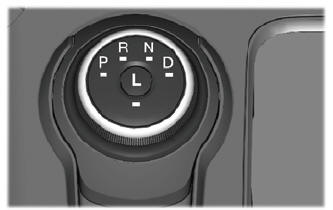
Your vehicle has an electronic transmission selector. The transmission selector is on the center console. The gears are selected by rotating the transmission selector to PRNDL.
- Park (P)
- Reverse (R)
- Neutral (N)
- Drive (D)
- Low (L)
Putting your vehicle in gear:
- Fully press down the brake pedal.
- Rotate the transmission selector to the position you want and release.
- The transmission position you select illuminates.
- Release the brake pedal and your transmission remains in the selected gear.
Note: If you attempt to leave your vehicle when it is in gear, your vehicle automatically shifts into park (P).
Automatic Transmission Position Indicators
The instrument cluster displays the current position.
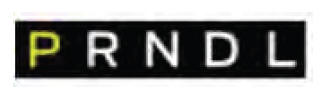
Note: The position could illuminate on the transmission selector.
 Automatic Transmission Positions
Park (P)
This position locks the driveline and
prevents the wheels from turning.
The engine can start with the shifter in this
position.
The electric parking brake could apply if:
You shift to park (P) on a slope...
 Temporary Neutral Mode
What Is Temporary Neutral Mode
This mode keeps your vehicle in neutral
(N) when you switch your vehicle off. Use
this mode if you exit your vehicle or switch
your vehicle off at an automatic car wash...
Other information:
Ford Escape 2020-2026 Service Manual: Removal and Installation - Hazard Flasher Switch
Removal NOTE: Removal steps in this procedure may contain installation details. Remove the center registers. Refer to: Center Registers (412-00 Climate Control System - General Information, Removal and Installation). Release the tabs and remove the hazard flasher switch from the center registers...
Ford Escape 2020-2026 Owners Manual: Customizing the Instrument Cluster Display - Vehicles With: 6.5 Inch Instrument Cluster Display Screen/12.3 Inch Instrument Cluster Display Screen
Adding Screens Using Select Screens Select Select Screens. Use the controls on the steering wheel to highlight a screen to add. Press the OK button. Note: The amount of screens you can add is limited, if the selected screen does not appear you must deselect screens from the select screens menu...
Categories
- Manuals Home
- 4th Generation Ford Escape Owners Manual
- 4th Generation Ford Escape Service Manual
- Switching the Lane Keeping System On and Off. Switching the Lane Keeping System Mode. Alert Mode
- What Is the Tire Pressure Monitoring System. Tire Pressure Monitoring System Overview
- Electric Parking Brake
- New on site
- Most important about car
Sitting in the Correct Position
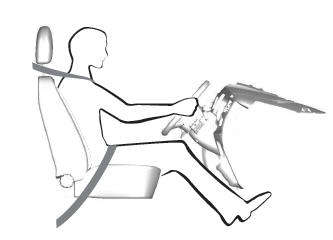
When you use them properly, the seat, head restraint, seatbelt and airbags will provide optimum protection in the event of a crash.

Copyright © 2026 www.fordescape4.com