
Ford Escape: Instrument Cluster Display / EV Coach - Hybrid Electric Vehicle (HEV)/Plug-In Hybrid Electric Vehicle (PHEV)
EV coach can help you get the most out of your vehicle's electric driving capabilities.
Note: EV coach is a selectable screen. See Customizing the Instrument Cluster Display.
When you are accelerating or maintaining speed you see a blue or white solid bar indicating vehicle power. You may also see a blue rectangular box which shows the power level at which the engine turns on.
- When the power level is within the box, the color of the bar is blue. This means you are in electric operation and the engine is off.
- When the power level is outside of the box, the color of the bar is white. This means you are in hybrid operation with a combination of the electric motor and the engine providing vehicle power.
When you are decelerating with either your foot off the accelerator pedal or on the brake pedal, a green or white solid bar displays indicating the power being used to slow down your vehicle. You may also see a green rectangular box which shows the amount of power that can be recaptured by the regenerative braking system and returned to the high voltage battery.
- When the power level is within the box, the color of the bar will be all green. This means that the regenerative braking system is being used to efficiently slow your vehicle down and return the maximum percentage of energy to the high voltage battery.
- When the power level is outside of the box, then the bar is white. This means both the regenerative braking system and conventional braking system are being used.
 Fuel Economy Display - Gasoline, Hybrid Electric Vehicle (HEV), Plug-In
Hybrid Electric Vehicle (PHEV)
Fuel Economy Display - Gasoline
An instant fuel economy gauge is provided
along with average fuel economy. Average
fuel economy is continuously averaged
since the last reset...
 What Is Electric Efficiency - Plug-In Hybrid Electric Vehicle (PHEV)
This screen shows your average driving
distance per kilowatt-hour of electricity
used on your plug-in hybrid vehicle. The
value is calculated only when your
available electric range is being used and
the gasoline engine is off...
Other information:
Ford Escape 2020-2026 Service Manual: Removal and Installation - Center Display Screen
Special Tool(s) / General Equipment Interior Trim Remover Removal NOTE: Removal steps in this procedure may contain installation details. Release the clips and remove the display unit rear trim panel. Use the General Equipment: Interior Trim Remover Remove the bolts and position the information and entertainment display panel up...
Ford Escape 2020-2026 Service Manual: Removal and Installation - Oil Pressure Switch
Materials Name Specification Motorcraft® Thread Sealant with PTFETA-24-B WSK-M2G350-A2 Removal NOTE: Removal steps in this procedure may contain installation details. With the vehicle in NEUTRAL, position it on a hoist...
Categories
- Manuals Home
- 4th Generation Ford Escape Owners Manual
- 4th Generation Ford Escape Service Manual
- General Procedures - Transmission Fluid Level Check
- Accessing the Trip Computer. Resetting the Trip Computer
- Description and Operation - Identification Codes
- New on site
- Most important about car
Sitting in the Correct Position
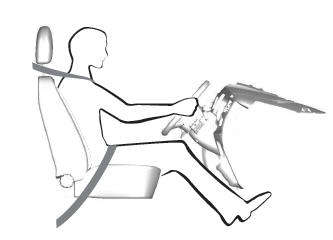
When you use them properly, the seat, head restraint, seatbelt and airbags will provide optimum protection in the event of a crash.
