
Ford Escape 2020-2026 Service Manual / Electrical / Electronic Feature Group / Multifunction Electronic Modules / Removal and Installation - Driver Door Module (DDM)
Ford Escape: Multifunction Electronic Modules / Removal and Installation - Driver Door Module (DDM)
Removal
NOTE: Removal steps in this procedure may contain installation details.
-
NOTE: If installing a new module, it is necessary to upload the module configuration information to the diagnostic scan tool prior to removing the module. This information must be downloaded into the new module after installation.
Carry out the PMI procedure for the DDM .
Refer to: Module Configuration - System Operation and Component Description (418-01 Module Configuration, Description and Operation).
-
Remove the front door trim panel.
Refer to: Front Door Trim Panel (501-05 Interior Trim and Ornamentation, Removal and Installation).
-
Remove the bolts and the DDM .
-
Disconnect the electrical connectors.
-
Disconnect the electrical connectors.
.jpg) |
Installation
-
To install, reverse the removal procedure.
-
Using the previous diagnostic scan tool session, carry out the PMI procedure for the DDM .
Refer to: Module Configuration - System Operation and Component Description (418-01 Module Configuration, Description and Operation).
-
If installing a new module, carry out the power door
window initialization on the drivers side front and rear door windows.
Refer to: Power Door Window Initialization - Vehicles With: One-Touch Open and Close Front Windows (501-11 Glass, Frames and Mechanisms, General Procedures).
 Removal and Installation - Body Control Module C (BCMC)
Removal
NOTE:
Removal steps in this procedure may contain installation details.
NOTE:
If the BCMC (body control module C) did not respond
to the diagnostic scan tool, As-Built Data may need to be entered as
part of the repair...
 Removal and Installation - Passenger Door Module (PDM)
Removal
NOTE:
Removal steps in this procedure may contain installation details.
NOTE:
Drivers side shown, passenger side similar.
NOTE:
If installing a new module, it is necessary to
upload the module configuration information to the diagnostic scan tool
prior to removing the module...
Other information:
Ford Escape 2020-2026 Service Manual: Removal and Installation - Rear Drive Unit (RDU) Actuator Motor
Removal Remove the rear axle assembly. Refer to: Axle Assembly (205-02A) . NOTICE: The RDU contains axle fluid. To prevent spillage, do not tilt the RDU during actuator motor removal or installation. NOTE: Mark the installation orientation prior to removal with a marker...
Ford Escape 2020-2026 Service Manual: General Procedures - Transmission Fluid Level Check
Materials Name Specification Motorcraft® MERCON® ULV Automatic Transmission FluidXT-12-QULV WSS-M2C949-A, MERCON® ULV Check Start the engine and allow to run for 1 minute. Turn engine off and wait 5 minutes. With the vehicle in NEUTRAL, position it on a hoist...
Categories
- Manuals Home
- 4th Generation Ford Escape Owners Manual
- 4th Generation Ford Escape Service Manual
- Electric Parking Brake
- Rear View Camera
- Switching the Rear Window Wiper On and Off. Reverse Wipe
- New on site
- Most important about car
Vehicle Identification
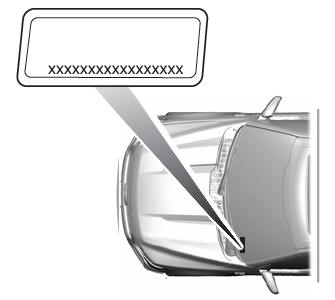
Locating the Vehicle Identification Number
The vehicle identification number is on the left-hand side of the instrument panel.

Copyright © 2026 www.fordescape4.com