
Ford Escape 2020-2026 Service Manual / Electrical / Electronic Feature Group
Ford Escape: Electrical / Electronic Feature Group
- Perimeter Anti-Theft Alarm
- Passive Anti-Theft System (PATS)
- Passive Anti-Theft System (PATS) - Vehicles With: Keyless Vehicle System
- Remote Convenience
- Cruise Control
- Cruise Control - Vehicles With: Adaptive Cruise Control
- Collision Warning and Collision Avoidance System
- Side and Rear Vision
- Lane Keeping System
- Multifunction Electronic Modules
 General Procedures - Module Programming
Check
NOTE:
Perform the following pre-checks to make sure module programming completes without errors.
Start the programming session in Key OFF, Engine OFF and prior to initiating programming, turn to KOEO ...

Other information:
Ford Escape 2020-2026 Service Manual: Description and Operation - Climate Control System - Vehicles With: Dual Automatic Temperature Control (DATC)/Electronic Automatic Temperature Control (EATC) - Component Location
Item Description 1 Driver side register 2 In-vehicle temperature & humidity sensor 3 Driver side register air discharge temperature sensor 4 Sunload sensor 5 Passenger side register air discharge temperature sensor 6 Passenger side register 7 Passenger side footwell air discharge temperature sensor 8 Center registers 9 ..
Ford Escape 2020-2026 Owners Manual: Automatic Transmission Positions
Park (P) This position locks the driveline and prevents the wheels from turning. The engine can start with the shifter in this position. The electric parking brake could apply if: You shift to park (P) on a slope. You shift to park (P) without the brake pedal fully pressed. Note: A warning tone sounds if you open the driver door and you have not shifted the transmission selector to park..
Categories
- Manuals Home
- 4th Generation Ford Escape Owners Manual
- 4th Generation Ford Escape Service Manual
- Description and Operation - Identification Codes
- General Procedures - Transmission Fluid Level Check
- Locating the Pre-Collision Assist Sensors
- New on site
- Most important about car
Sitting in the Correct Position
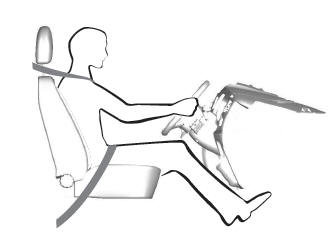
When you use them properly, the seat, head restraint, seatbelt and airbags will provide optimum protection in the event of a crash.

Copyright © 2026 www.fordescape4.com