
Ford Escape 2020-2026 Owners Manual / Instrument Cluster Display / Vehicle Charging Status - Plug-In Hybrid Electric Vehicle (PHEV)
Ford Escape: Instrument Cluster Display / Vehicle Charging Status - Plug-In Hybrid Electric Vehicle (PHEV)
The vehicle charge status displays when you switch off your vehicle and when you switch on your vehicle when plugged in. Charging status includes the charge start or charge end time as appropriate. You can modify your charge settings though the touchscreen. See SYNC™ 3.
 What Is the Trip Summary - Hybrid Electric Vehicle (HEV)/Plug-In Hybrid
Electric Vehicle (PHEV)
The trip summary displays upon shutting
off your vehicle. The values are cumulative
since you last started your vehicle.
The information shown is the same as the
This Trip screen...

Other information:
Ford Escape 2020-2026 Owners Manual: Settings
Press the button to enter the settings menu. Once you select a tile, press the button next to a menu item to view an explanation of the feature or setting. Sound Select this tile to adjust the sound settings. Clock Select this tile to adjust the clock settings. Bluetooth Select this tile to switch Bluetooth on and off and adjust the settings. Phone Select this tile to connect, disconnect, ..
Ford Escape 2020-2026 Service Manual: Removal and Installation - SYNC Module [APIM]
Removal Remove the ACM . Refer to: Audio Front Control Module (ACM) (415-00 Information and Entertainment System - General Information, Removal and Installation). Remove the screws and position the APIM down. Torque: 44 lb.in (5 Nm) Disconenct the electrical connectors and remove the APIM and bracket as an assembly. ..
Categories
- Manuals Home
- 4th Generation Ford Escape Owners Manual
- 4th Generation Ford Escape Service Manual
- Power Outlet - Vehicles With: 12V Power Outlet
- Accessing the Trip Computer. Resetting the Trip Computer
- All-Wheel Drive
- New on site
- Most important about car
Vehicle Identification
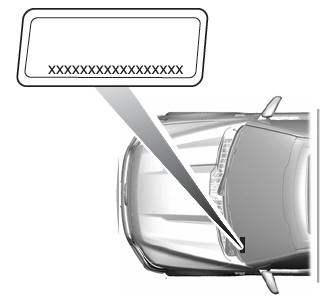
Locating the Vehicle Identification Number
The vehicle identification number is on the left-hand side of the instrument panel.

Copyright © 2026 www.fordescape4.com