
Ford Escape: Navigation (If Equipped) / Setting a Destination
Destination Entry Menu

Setting a Destination Using the Text Entry Screen
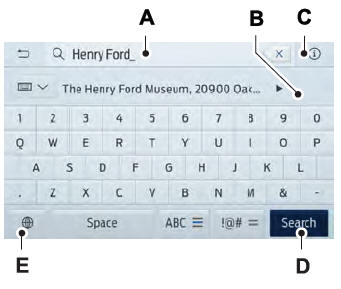
- Text entry field.
- Automatic suggestions based on the text you enter.
- Information icon.
- Search.
- Keyboard settings.
Note: Select one of the suggestions to copy the detail to the text entry field.
You can search by entering all or part of the destination, such as the Address, POI Category or Name, Intersection, City, Latitude/Longitude, etc. Tips: If you do not specify a location, the system will use the current vehicle location. You can specify a location by address, city, state or zip code. For additional search support, please visit: support.ford.com.
Note: Press the button in the top right-hand corner of the main map to display estimated time of arrival, remaining travel time or distance to destination.
Setting a Destination Using the Map Screen

- Re-center the map.
- Selected location.
- 3D map rotation. Swipe left or right.
- Start route guidance.
- Destination name.
Select the location on the map.
Select Start to begin route guidance.
 Navigation (If Equipped)
Note: For more information, refer to our
website.
Select the navigation option on
the feature bar.
Map view menu.
Zoom out.
Zoom in.
Route guidance menu...
 Changing the Format of the Map
Display the map in one of the following
formats:
A two-dimensional map with the
direction you are traveling toward the
top of the screen.
A two-dimensional map with north
toward the top of the screen...
Other information:
Ford Escape 2020-2026 Service Manual: Removal and Installation - Front Door Window Regulator and Motor
Special Tool(s) / General Equipment Punch Removal WARNING: The following procedure prescribes critical repair steps required for correct restraint system operation during a crash. Follow all notes and steps carefully. Failure to follow step instructions may result in incorrect operation of the restraint system and increases the risk of serious personal injury or death in..
Ford Escape 2020-2026 Service Manual: Removal and Installation - Instrument Panel Cluster (IPC)
Special Tool(s) / General Equipment Interior Trim Remover Removal NOTE: Removal steps in this procedure may contain installation details. NOTE: If installing a new module, it is necessary to upload the module configuration information to the scan tool prior to removing the module. This information must be downloaded into the new module after installation. Using a d..
Categories
- Manuals Home
- 4th Generation Ford Escape Owners Manual
- 4th Generation Ford Escape Service Manual
- Plug-In Hybrid Electric Vehicle Drive Modes
- Description and Operation - Identification Codes
- Power Outlet - Vehicles With: 12V Power Outlet
- New on site
- Most important about car
Symbols Glossary
These are some of the symbols you may see on your vehicle.
 Air conditioning system
