
Ford Escape 2020-2026 Owners Manual / Connected Vehicle / Connected Vehicle – Troubleshooting - Vehicles With: Modem and SYNC 3
Ford Escape: Connected Vehicle / Connected Vehicle – Troubleshooting - Vehicles With: Modem and SYNC 3
Modem
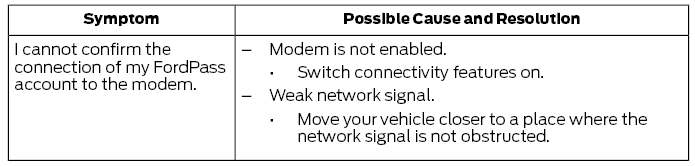
SYNC 3
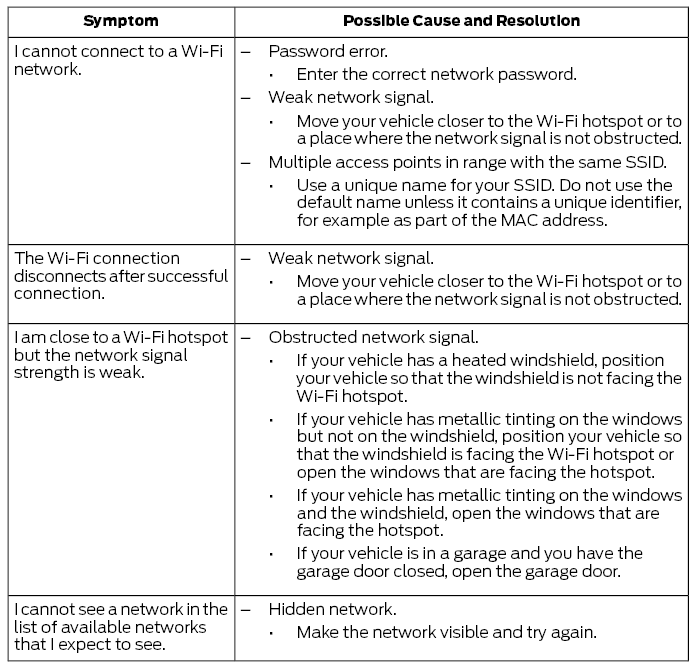
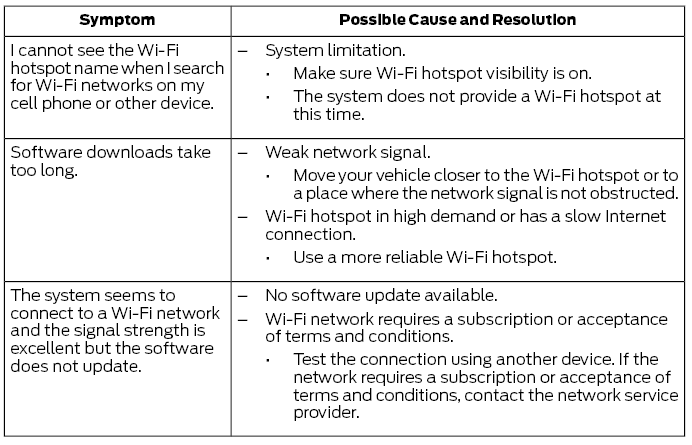
 Connecting the Vehicle to a Mobile Network. Connecting the Vehicle to a Wi-Fi Network
Connecting the Vehicle to a Mobile Network
What Is the Modem
The modem allows access to a
range of features built into your
vehicle.
Enabling and Disabling the Modem
Press Settings...

Other information:
Ford Escape 2020-2026 Service Manual: Removal and Installation - Front Side Member Section
Special Tool(s) / General Equipment Resistance Spotwelding Equipment Spherical Cutter Air Body Saw MIG/MAG Welding Equipment Spot Weld Drill Bit Locking Pliers Removal WARNING: Electric vehicles damaged by a crash may have compromised high voltage safety systems and present a potential high voltage electrical shock hazard. Exercise caution and wear..
Ford Escape 2020-2026 Service Manual: Description and Operation - Seatbelt Systems - System Operation and Component Description
System Operation Emergency Locking Retractor (ELR) All retractors have an Emergency Locking Retractor (ELR) mode, which is a vehicle-sensitive feature designed to activate and lock the seatbelt webbing during hard braking, cornering, or an impact of approximately 24 km/h (15 mph). The Emergency Locking Retractor (ELR) feature helps reduce the forward movement of the driver and passengers...
Categories
- Manuals Home
- 4th Generation Ford Escape Owners Manual
- 4th Generation Ford Escape Service Manual
- Accessing the Trip Computer. Resetting the Trip Computer
- Electric Parking Brake
- Symbols Glossary
- New on site
- Most important about car
Fastening the Seatbelts

Copyright © 2026 www.fordescape4.com