
Ford Escape: MyKey™ / MyKey – Troubleshooting
MyKey – Information Messages - Vehicles With: Push Button Start
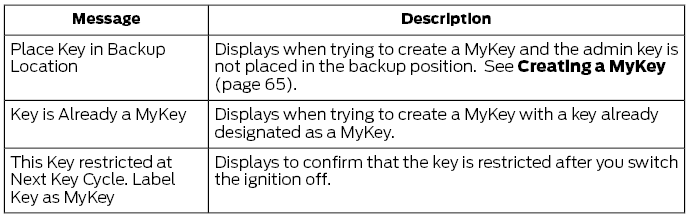
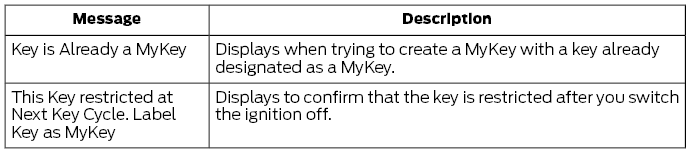
MyKey – Information Messages - Vehicles With: Flip Key
MyKey – Frequently Asked Questions - Vehicles With: Push Button Start
What is an admin key?
An admin key is a key that you have not created as a MyKey. See Creating a MyKey.
Why am I not able create a MyKey?
You have not placed the admin key in the backup position. See Creating a MyKey. The key used to switch the ignition on is not an admin key. The key used to switch the ignition on is the only admin key. There has to be at least one admin key. You did not switch the ignition off after creating the last MyKey.
Why am I not able to program a MyKey?
The admin key is not inside your vehicle. The key used to switch the ignition on is not an admin key. You have not created any MyKeys. See Creating a MyKey.
Why am I not able to clear the MyKeys?
The admin key is not inside your vehicle. The key used to switch the ignition on is not an admin key. You have not created any MyKeys. See Creating a MyKey.
Why is the MyKey distance not accumulating?
The key used to start the engine is an admin key. An admin key and a MyKey are inside your vehicle. You have not created any MyKeys. See Creating a MyKey. You have cleared the MyKeys. See Clearing All MyKeys.
Why am I not able to start the engine with a MyKey?
An admin key and a MyKey are inside your vehicle. The system recognizes only the admin key when both are present.
MyKey – Frequently Asked Questions - Vehicles With: Flip Key
What is an admin key?
An admin key is a key that you have not created as a MyKey. See Creating a MyKey.
Why am I not able to create a MyKey?
The key used to switch the ignition on is not an admin key. The key used to switch the ignition on is the only admin key. There has to be at least one admin key.
Why am I not able to program a MyKey?
The key used to switch the ignition on is not an admin key. You have not created any MyKeys. See Creating a MyKey.
Why am I not able to clear the MyKeys?
The key used to switch the ignition on is not an admin key. You have not created any MyKeys. See Creating a MyKey.
Why is the MyKey distance not accumulating?
The key used to start the engine is an admin key. You have not created any MyKeys. See Creating a MyKey. You have cleared the MyKeys. See Clearing All MyKeys.
 Programming a MyKey. Clearing All MyKeys. Checking MyKey System Status.
Using MyKey With Remote Start Systems
Programming a MyKey. Clearing All MyKeys. Checking MyKey System Status.
Using MyKey With Remote Start Systems
Programming a MyKey
You can program any remote control to
become a restricted MyKey, but you must
leave one unmodified as an admin key.
Switch the ignition on using an admin
key...

Other information:
Ford Escape 2020-2026 Service Manual: Removal and Installation - Windshield Wiper Pivot Arm
Special Tool(s) / General Equipment Two Leg Puller Removal NOTE: LH (left-hand) side shown, RH (right-hand) side similar. Remove the windshield wiper pivot arm nut cover. Remove the windshield wiper pivot arm nut. Remove the windshield wiper pivot arm. Use the General Equipment: Two Leg Puller ..
Ford Escape 2020-2026 Owners Manual: Automatic Transmission
Automatic Transmission Precautions WARNING: When your vehicle is stationary, keep the brake pedal fully pressed when shifting gears. Failure to follow this instruction could result in personal injury, death or property damage. WARNING: Do not apply the brake pedal and accelerator pedal simultaneously. Applying both pedals simultaneously for more than a few seconds will limit power, which ..
Categories
- Manuals Home
- 4th Generation Ford Escape Owners Manual
- 4th Generation Ford Escape Service Manual
- Removal and Installation - All-Wheel Drive (AWD) Module - 1.5L EcoBoost (132kW/180PS) – I3 (Y1)/2.0L EcoBoost (177kW/240PS) – MI4
- General Procedures - Brake Service Mode Activation and Deactivation
- Fuel Quality
- New on site
- Most important about car
Sitting in the Correct Position
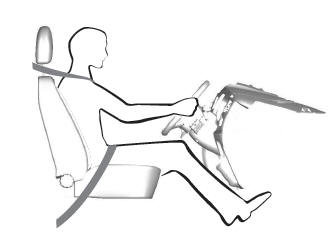
When you use them properly, the seat, head restraint, seatbelt and airbags will provide optimum protection in the event of a crash.
