
Ford Escape 2020-2026 Service Manual / Electrical / Information and Entertainment Systems / Information and Entertainment System - General Information / Removal and Installation - Instrument Panel Center Speaker
Ford Escape: Information and Entertainment System - General Information / Removal and Installation - Instrument Panel Center Speaker
Special Tool(s) / General Equipment
| Interior Trim Remover |
Removal
NOTE: Removal steps in this procedure may contain installation details.
-
Release the clips and remove the instrument panel speaker grille.
Use the General Equipment: Interior Trim Remover
 |
-
Remove the bolts and position the instrument panel center speaker up.
Torque: 22 lb.in (2.5 Nm)
 |
-
Disconnect the electrical connector and remove the instrument panel center speaker.
 |
Installation
-
To install, reverse the removal procedure.
 Removal and Installation - Center Display Screen
Special Tool(s) /
General Equipment
Interior Trim Remover
Removal
NOTE:
Removal steps in this procedure may contain installation details...
 Removal and Installation - Low Voltage Differential Signalling (LVDS) Cable
Removal
NOTE:
Removal steps in this procedure may contain installation details.
NOTE:
The original equipment LVDS
cable is part of the wiring harness and cannot be removed...
Other information:
Ford Escape 2020-2026 Owners Manual: Cooling System Capacity and Specification - 1.5L EcoBoost™
Use coolant that meets the defined specification. If you do not use coolant that meets the defined specification, it could result in: Component damage that your vehicle warranty does not cover. Reduced vehicle performance. Capacities Materials ..
Ford Escape 2020-2026 Owners Manual: USB Ports. Apps. Supported Media Players, Formats and Metadata Information
USB Ports The USB ports are located in the media bin under the instrument panel. This feature allows you to plug in USB media devices, memory sticks, flash drives or thumb drives, and charge devices if they support this feature. Select this option to play audio from your USB device. Apps The system supports the use of certain audio apps such as iHeartRadio through a USB or Bluetooth enable..
Categories
- Manuals Home
- 4th Generation Ford Escape Owners Manual
- 4th Generation Ford Escape Service Manual
- Accessing the Trip Computer. Resetting the Trip Computer
- Electric Parking Brake
- Switching the Rear Window Wiper On and Off. Reverse Wipe
- New on site
- Most important about car
Sitting in the Correct Position
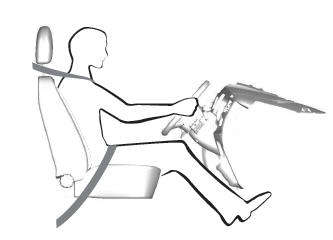
When you use them properly, the seat, head restraint, seatbelt and airbags will provide optimum protection in the event of a crash.

Copyright © 2026 www.fordescape4.com