Ford Escape: Entertainment / SiriusXM® Satellite Radio (If Activated)
Note: This feature may not be available in all markets and requires an active subscription.
SiriusXM satellite radio is a subscription-based satellite radio service that broadcasts a variety of music, sports, news, weather, traffic and entertainment programming. Your factory-installed SiriusXM satellite radio system includes hardware and a limited subscription term that begins on the date of sale or lease of your vehicle. See an authorized dealer for availability.
For more information on extended subscription terms (a service fee is required), the online media player and a list of SiriusXM satellite radio channels, and other features, please visit www.siriusxm.com in the United States, www.siriusxm.ca in Canada, or call SiriusXM at 1-888-539-7474.
Note: SiriusXM reserves the unrestricted right to change, rearrange, add or delete programming. This includes canceling, moving or adding particular channels, and its prices, at any time, with or without notice to you. We are not responsible for any such programming changes.
Note: This receiver includes the eCos real-time operating system. eCos is published under the eCos License.
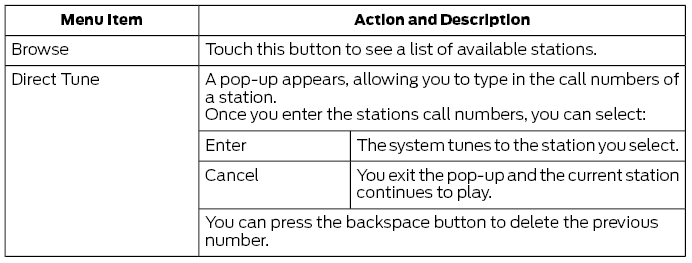
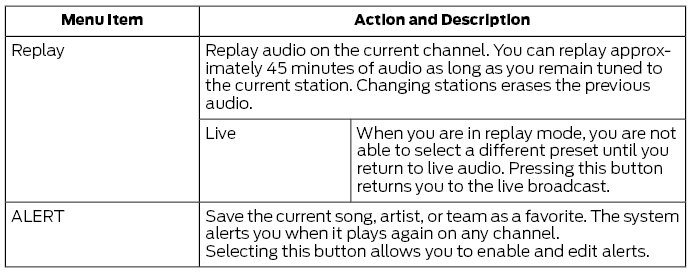
The following buttons are available for SiriusXM:
Memory Presets
To set a preset, tune to the station then press and hold one of the memory preset buttons. The audio mutes briefly while the system saves the station and returns once the station is stored.
You may be able to add additional preset pages using the settings option on the feature bar.
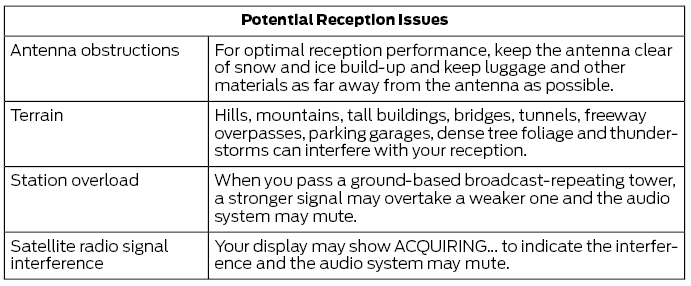
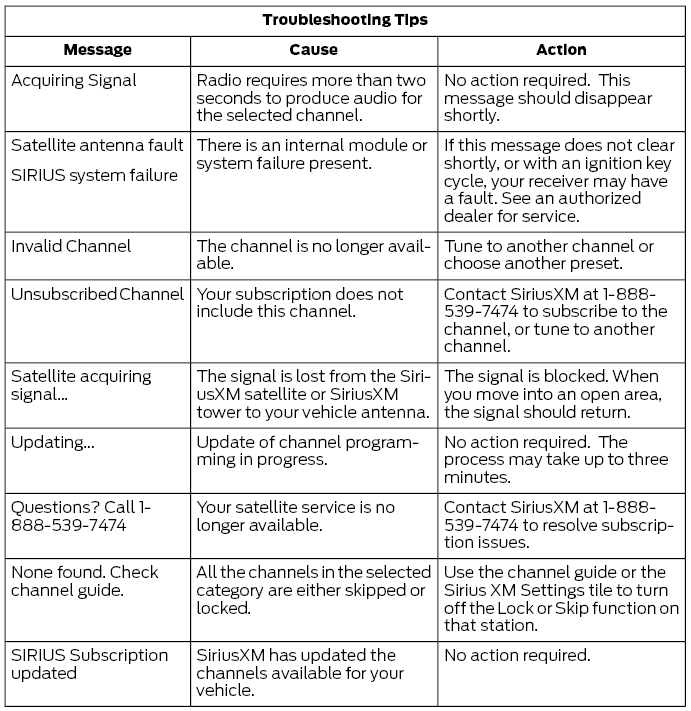
SiriusXM Satellite Radio Reception Factors and Troubleshooting
 AM/FM Radio
Tuning a Station
You can use the tune or seek controls on
the radio bezel to select a station.
To tune a station using the
touchscreen, select:
A pop up appears, allowing you to type in
the frequency of a station...
 HD Radio™ Information (If Available)
To activate HD radio, please see the Radio
Settings in the Settings Chapter.
Note: HD Radio broadcasts are not
available in all markets.
HD Radio technology is the digital
evolution of analog AM/FM radio...
Other information:
Ford Escape 2020-2026 Service Manual: Diagnosis and Testing - Wireless Accessory Charging Module (WACM)
Diagnostic Trouble Code (DTC) Chart Diagnostics in this manual assume a certain skill level and knowledge of Ford-specific diagnostic practices. REFER to: Diagnostic Methods (100-00 General Information, Description and Operation). Module DTC Description Action BCM B1554:11 Wireless Accessory Charger Enable/Disable: Circuit Short To Ground GO to Pinpoint Test A BCM B1554:13..
Ford Escape 2020-2026 Owners Manual: Pre-Collision Assist Precautions. Pre-Collision Assist Limitations
Pre-Collision Assist Precautions WARNING: You are responsible for controlling your vehicle at all times. The system is designed to be an aid and does not relieve you of your responsibility to drive with due care and attention. Failure to follow this instruction could result in the loss of control of your vehicle, personal injury or death. WARNING: The system does not detect vehicles that a..
Categories
- Manuals Home
- 4th Generation Ford Escape Owners Manual
- 4th Generation Ford Escape Service Manual
- Switching the Lane Keeping System On and Off. Switching the Lane Keeping System Mode. Alert Mode
- Fuel Quality
- Rear View Camera
- New on site
- Most important about car
Vehicle Identification
Locating the Vehicle Identification Number
The vehicle identification number is on the left-hand side of the instrument panel.