
Ford Escape 2020-2026 Owners Manual / SYNC™ 3 (If Equipped) / Phone / Pairing Your Cell Phone for the First Time
Ford Escape: Phone / Pairing Your Cell Phone for the First Time
Go to the settings menu on your cell phone and switch Bluetooth on.
 Select the phone option on the
feature bar.
- Select Add Phone.
Note: A prompt alerts you to search for your vehicle on your cell phone.
- Select your vehicle on your cell phone.
Note: A number appears on your cell phone and on the touchscreen.
- Confirm that the number on your cell phone matches the number on the touchscreen.
- Note: The touchscreen indicates that you have successfully paired your cell phone.
- Download the phonebook from your cell phone when you are prompted.
- Note: If you pair more than one cell phone, use the phone settings to specify the primary phone. You can change this setting at any time.
 Phone
WARNING: Driving while distracted
can result in loss of vehicle control, crash
and injury. We strongly recommend that
you use extreme caution when using any
device that may take your focus off the
road...
 Using Your Cell Phone
Recent Call List
Display and select an entry from a list of
previous calls.
Contacts
Display a smart search form to look up your
contacts. Use the List button to
alphabetically sort your contacts...
Other information:
Ford Escape 2020-2026 Service Manual: Removal and Installation - Headlamp Assembly
Special Tool(s) / General Equipment Ford Diagnostic Equipment Removal NOTE: Removal steps in this procedure may contain installation details. NOTE: Vehicle equipped with halogen headlamps shown, light emitting diode (LED) headlamps similar...
Ford Escape 2020-2026 Service Manual: Description and Operation - Fuel Tank and Lines - System Operation and Component Description
System Operation Fuel Systems The fuel system supplies the fuel injectors with clean fuel at a controlled pressure. The PCM controls the fuel pump and monitors the fuel pump circuit. The PCM controls the fuel injector ON/OFF cycle duration and determines the correct timing and amount of fuel delivered...
Categories
- Manuals Home
- 4th Generation Ford Escape Owners Manual
- 4th Generation Ford Escape Service Manual
- Rear View Camera
- Removal and Installation - All-Wheel Drive (AWD) Module - 1.5L EcoBoost (132kW/180PS) – I3 (Y1)/2.0L EcoBoost (177kW/240PS) – MI4
- What Is the Tire Pressure Monitoring System. Tire Pressure Monitoring System Overview
- New on site
- Most important about car
Sitting in the Correct Position
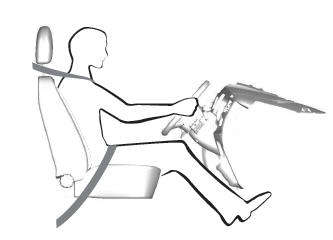
When you use them properly, the seat, head restraint, seatbelt and airbags will provide optimum protection in the event of a crash.

Copyright © 2026 www.fordescape4.com