
Ford Escape: SYNC™ (If Equipped) / Using SYNC™ With Your Media Player
SYNC supports digital media sources including: iPod, Bluetooth devices, and most USB drives. SYNC also supports audio formats, such as MP3, WMA, WAV and ACC.
Media Sources
The AUX or MEDIA button allows you to view and select available media sources.
Press the AUX or MEDIA button to view your sources. Use the directional arrows and OK button to select your source. You can also use the steering wheel audio controls.
Audio Voice Commands
 Press the voice button. You can
do things like play a specific song
or album, or tune to a radio
station. When prompted, say a command.
See the following table for example
commands. Not all commands may be
available on your vehicle.
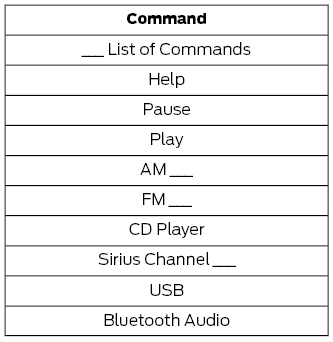
__ is a dynamic listing, meaning that it could be the name of anything, such as an artist, station, or media source.
 SYNC Mobile Apps
The system enables voice and steering
wheel control of SYNC AppLink enabled
smartphone apps. When an app is running
through AppLink, you can control main
features of the app through voice
commands and steering wheel controls...
 SYNC™ Troubleshooting
Your SYNC system is easy to use. However,
should questions arise, see the tables
below.
Use your regional Ford website at any time
to check your phone's compatibility,
register your account and set preferences
as well as access a customer
representative via an online chat (during
certain hours)...
Other information:
Ford Escape 2020-2026 Service Manual: General Procedures - Heater Core Leak Check
Inspection NOTE: A coolant leak in the heater hose could follow the heater core tube to the heater core and appear as a leak in the heater core. Inspect for evidence of coolant leakage at the heater hose to heater core attachments. NOTE: Spring-type clamps are installed as original equipment...
Ford Escape 2020-2026 Service Manual: Description and Operation - Handles, Locks, Latches and Entry Systems - Overview
Overview The power lock/unlock feature locks or unlocks the doors upon request from any of the following inputs: Door Lock Control Switch Keyless entry keypad (if equipped) Passive entry system (if equipped) RKE transmitter (if equipped) The driver door can also be unlocked/ locked manually using the mechanical key in a door lock cylinder...
Categories
- Manuals Home
- 4th Generation Ford Escape Owners Manual
- 4th Generation Ford Escape Service Manual
- Accessing the Trip Computer. Resetting the Trip Computer
- Removal and Installation - All-Wheel Drive (AWD) Module - 1.5L EcoBoost (132kW/180PS) – I3 (Y1)/2.0L EcoBoost (177kW/240PS) – MI4
- General Procedures - Transmission Fluid Level Check
- New on site
- Most important about car
Symbols Glossary
These are some of the symbols you may see on your vehicle.
 Air conditioning system
