
Ford Escape 2020-2026 Owners Manual / Keys and Remote Controls / Using the Remote Control
Ford Escape: Keys and Remote Controls / Using the Remote Control
Use your remote control to access various vehicle systems.
Note:The buttons on your remote may vary depending on the vehicle region or options.
Unlock
 Press the button to unlock all
doors.
Lock
 Press the button to lock all
doors.
Remote Start (If Equipped)
 Press the button to remote start.
Liftgate (If Equipped)
 Press the button to open or close
the liftgate.
Panic Alarm
 Press the button to sound the
panic alarm.
 Remote Control Limitations
WARNING: Changes or
modifications not expressively approved
by the party responsible for compliance
could void the user's authority to operate
the equipment...
 Opening and Closing the Flip Key. Removing the Key Blade
Opening Your Flip Key
Press the round button on the remote
control to extend the flip key.
Note: Inspect the key blade for debris.
Periodically clean with a brush...
Other information:
Ford Escape 2020-2026 Service Manual: Removal and Installation - Exterior Front Door Handle
Removal NOTE: LH (left-hand) side shown, RH (right-hand) side similar. NOTE: Removal steps in this procedure may contain installation details. Vehicles with passive entry Remove the front door window regulator and motor. Refer to: Front Door Window Regulator and Motor (501-11 Glass, Frames and Mechanisms, Removal and Installation)...
Ford Escape 2020-2026 Owners Manual: Locating the Pre-Collision Assist Sensors
Camera. Radar sensor (if equipped). If a message regarding a blocked sensor or camera appears in the information display, something is obstructing the radar signals or camera images. The radar sensor is behind the fascia cover in the center of the lower grille...
Categories
- Manuals Home
- 4th Generation Ford Escape Owners Manual
- 4th Generation Ford Escape Service Manual
- Fuel Quality
- Adjusting the Headlamps
- Opening and Closing the Hood
- New on site
- Most important about car
Sitting in the Correct Position
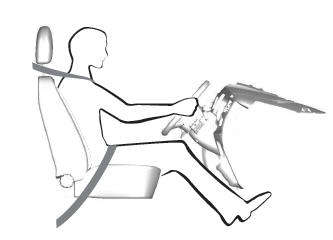
When you use them properly, the seat, head restraint, seatbelt and airbags will provide optimum protection in the event of a crash.

Copyright © 2026 www.fordescape4.com