Ford Escape: Interior Lighting / Description and Operation - Interior Lighting - Overview
Overview
The interior lighting system consists of:
- Courtesy lamps
- Demand lamps
- Ambient lighting
The courtesy lamps subsystem consists of:
- Interior overhead lamps
- Luggage compartment lamp
- Cargo lamp
- Courtesy lamp switch (integrated into the overhead console)
- Door ajar switches (integrated into the door latches)
- Liftgate ajar switch (integrated into the liftgate latch, manual liftgate)
- RGTM (power liftgate only)
- BCM
The courtesy lamps provide illumination to the vehicle interior, front scuff plates and below the exterior mirrors when entering or exiting the vehicle or when requested using the courtesy lamp switch located on the headlamp switch.
The demand lamps subsystem consists of:
- Interior overhead lamps (map lamps)
- Vanity mirror lamps
- Luggage compartment lamp
- Cargo lamp
- Media bin lamp
- BCM
The demand lamps provide illumination to specific areas within the vehicle when needed.
The BCM supplies voltage to the demand lamps when the battery saver feature is not active.
The ambient lighting subsystem consists of:
- Ambient lighting Light Emitting Diodes (LEDs)
- FDIM (touchscreen)
- BCM
The ambient lighting is controlled using the FDIM (touchscreen) controls. The ambient lighting provides aesthetically colored illumination to the following locations for illuminated entry or when the ignition is in RUN with the parking lamps on:
- Front console storage bin
- Front doors
- Front footwells

 Description and Operation - Interior Lighting - System Operation and Component Description
System Operation
System Diagram
Item
Description
1
LIN
2
Floor Console Storage Bin Lamp
3
Front Footwell Ambient Lighting LEDs
4
Door Ambient Lighting LEDs
5
LIN
6
HS-CAN1
7
APIM
8
HS-CAN3
9
FDIM
10
GWM
11
Headlamp Switch
12
Door Ajar Switches
13
without power liftg..
Other information:
Ford Escape 2020-2026 Service Manual: Removal and Installation - Front Door Check Arm
Removal NOTE: Removal steps in this procedure may contain installation details. NOTE: LH side shown, RH side similar. Open the door. Remove the check arm bolt. Torque: 18 lb.ft (25 Nm) Remove the front door trim panel. Refer to: Front Door Trim Panel (501-05 Interior Trim and Ornamentation, Removal and Ins..
Ford Escape 2020-2026 Service Manual: General Procedures - Run the Engine
NOTE: The engine running diagnostic mode is a hybrid powertrain control module strategy which is separate from the normal operating strategy. The specifics described here are applicable only to the power-split hybrid variants. When in this mode, the engine is running and does not turn off, as it does during normal operation. The engine RPM may be increased to the desired speed as the vehicl..
Categories
- Manuals Home
- 4th Generation Ford Escape Owners Manual
- 4th Generation Ford Escape Service Manual
- Switching the Lane Keeping System On and Off. Switching the Lane Keeping System Mode. Alert Mode
- All-Wheel Drive
- Symbols Glossary
- New on site
- Most important about car
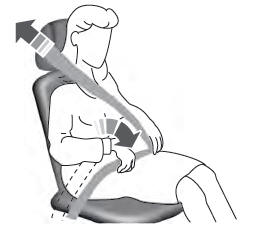
Adjusting the Seatbelts During Pregnancy
WARNING: Always ride and drive with your seatback upright and properly fasten your seatbelt. Fit the lap portion of the seatbelt snugly and low across the hips. Position the shoulder portion of the seatbelt across your chest. Pregnant women must follow this practice. See the following figure.