
Ford Escape 2020-2026 Service Manual / Powertrain / Fuel System - General Information
Ford Escape: Powertrain / Fuel System - General Information
 Removal and Installation - Muffler and Tailpipe - Full Hybrid Electric Vehicle (FHEV)
Special Tool(s) /
General Equipment
Hose Clamp(s)
Removal
NOTE:
Removal steps in this procedure may contain installation details.
With the vehicle in NEUTRAL, position it on a hoist...

Other information:
Ford Escape 2020-2026 Service Manual: General Procedures - Bezel Diagnostics
Check NOTE: If there is a concern with one of the following components and Bezel Diagnostics cannot be accessed, obtain the module part number or ESN by referencing the label attached to the module. Inoperative ACM Inoperative (blank or does not power on) display unit (non-touchscreen display or touchscreen display) Inoperative FCIM or radio control panel Inoperative st..
Ford Escape 2020-2026 Service Manual: Description and Operation - Body and Frame
Body The body consists of the following: Front frame rails constructed of high-strength Dual Phase (DP) 600 steel Rear frame rails constructed of Boron ultra high-strength steel Fender reinforcement tube constructed of Dual Phase (DP) 800 high-strength steel Fender apron assembly constructed of Dual Phase (DP) 600 high-strength steel Liftgate outer panel constructed..
Categories
- Manuals Home
- 4th Generation Ford Escape Owners Manual
- 4th Generation Ford Escape Service Manual
- Electric Parking Brake
- Symbols Glossary
- What Is the Tire Pressure Monitoring System. Tire Pressure Monitoring System Overview
- New on site
- Most important about car
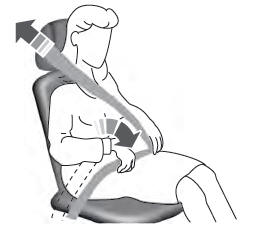
Adjusting the Seatbelts During Pregnancy
WARNING: Always ride and drive with your seatback upright and properly fasten your seatbelt. Fit the lap portion of the seatbelt snugly and low across the hips. Position the shoulder portion of the seatbelt across your chest. Pregnant women must follow this practice. See the following figure.

Copyright © 2026 www.fordescape4.com