
Ford Escape 2020-2026 Owners Manual / SYNC™ 3 (If Equipped) / General Information / Updating the System
Ford Escape: General Information / Updating the System
Updating the System Using a USB Drive
Downloading an Update
- Go to the SYNC update page on the local Ford website.
- Download the update.
Note: The website notifies you if an update is available.
- Insert a USB drive into your computer.
Note: The USB drive needs to be empty and meet the minimum requirements detailed on the website.
- Follow the instructions provided to download the update to the USB drive.
Installing an Update
Note: You can use the system when an installation is in progress.
- Disconnect all other USB devices from the USB ports.
- Connect the USB drive with the update to a USB port.
Note: Installation starts automatically within 10 minutes.
 Using the Touchscreen
Status bar.
Home screen.
Clock.
Outside air temperature.
Feature bar.
Status Bar
Cell phone microphone muted.
Audio system muted.
Software update installed...
 Updating the System Using a Wi-Fi Network Connection
Connecting to a Wi-Fi Network
Select the settings option on
the
feature bar.
Select Automatic Updates.
Select System Wi-Fi.
Switch System Wi-Fi on...
Other information:
Ford Escape 2020-2026 Service Manual: Description and Operation - Parking Aid - Component Location
Component Location - Parking Aid Camera Item Description 1 Audio system display 2 BCM 3 Rear parking aid camera ..
Ford Escape 2020-2026 Service Manual: Description and Operation - Module Configuration - System Operation and Component Description
System Operation Programmable Module Installation (PMI) PMI is a scan tool process which configures settings in a new module. Data used for the PMI process is automatically downloaded from the original module and stored when a scan tool session is started. If this data cannot be retrieved from the module being replaced, the scan tool may prompt for As-Built data entry or display a list o..
Categories
- Manuals Home
- 4th Generation Ford Escape Owners Manual
- 4th Generation Ford Escape Service Manual
- Switching the Rear Window Wiper On and Off. Reverse Wipe
- Description and Operation - Identification Codes
- Plug-In Hybrid Electric Vehicle Drive Modes
- New on site
- Most important about car
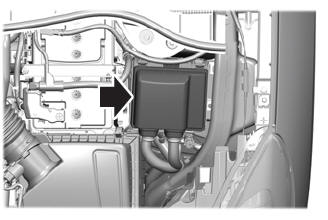
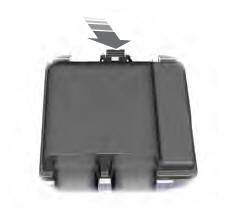
Under Hood Fuse Box
Locating the Under Hood Fuse Box
Accessing the Under Hood Fuse Box

Copyright © 2026 www.fordescape4.com