
Ford Escape 2020-2026 Service Manual / Powertrain / Automatic Transmission / Automatic Transmission - Automatic Transmission – HF45 / Removal and Installation - Halfshaft Seal LH
Ford Escape: Automatic Transmission - Automatic Transmission – HF45 / Removal and Installation - Halfshaft Seal LH
Special Tool(s) / General Equipment
.jpg) |
205-153
(T80T-4000-W)
Handle |
.jpg) |
307-758 Installer, Axle Seal -FWD |
Removal
-
With the vehicle in NEUTRAL, position it on a hoist.
Refer to: Jacking and Lifting - Overview (100-02 Jacking and Lifting, Description and Operation).
-
Remove the screws and the engine front undershield.
.jpg) |
-
Remove the LH halfshaft.
Refer to: Front Halfshaft LH (205-04 Front Drive Halfshafts, Removal and Installation).
-
Remove and discard halfshaft seal.
.jpg) |
Installation
-
Install a new halfshaft seal on the special tool.
Use Special Service Tool: 205-153 (T80T-4000-W) Handle. , 307-758 Installer, Axle Seal -FWD.
 |
-
Using the special tool, install the LH halfshaft seal.
Use Special Service Tool: 205-153 (T80T-4000-W) Handle. , 307-758 Installer, Axle Seal -FWD.
.jpg) |
-
Install the LH halfshaft.
Refer to: Front Halfshaft LH (205-04 Front Drive Halfshafts, Removal and Installation).
-
Check the transmission fluid level.
Refer to: Transmission Fluid Level Check (307-01B Automatic Transmission - Automatic Transmission – HF45, General Procedures).
-
Install the engine front undershield and the screws.
|
 Removal and Installation - Damper
Removal
Remove the engine.
Refer to: Engine (303-01C Engine, Removal).
Remove the bolts and the damper.
Installation
Install the damper and the bolts...
 Removal and Installation - Halfshaft Seal RH - AWD
Special Tool(s) /
General Equipment
205-153
(T80T-4000-W)
Handle
307-758Installer, Axle Seal -FWD
Flat Headed Screw Driver
Removal
Remove the power transfer unit...
Other information:
Ford Escape 2020-2026 Service Manual: Removal and Installation - Front Fender Moulding
Removal NOTE: Removal steps in this procedure may contain installation details. Remove the push pins. Remove the push pins. Remove the fasteners. Remove the retainer clips and front fender moulding...
Ford Escape 2020-2026 Service Manual: General Procedures - Welding Precautions
Check WARNING: Invisible ultraviolet and infrared rays emitted in welding can injure unprotected eyes and skin. Always use protection such as a welder's helmet with dark-colored filter lenses of the correct density. Electric welding will produce intense radiation, therefore, filter plate lenses of the deepest shade providing adequate visibility are recommended...
Categories
- Manuals Home
- 4th Generation Ford Escape Owners Manual
- 4th Generation Ford Escape Service Manual
- Child Safety Locks
- Symbols Glossary
- Power Outlet - Vehicles With: 12V Power Outlet
- New on site
- Most important about car
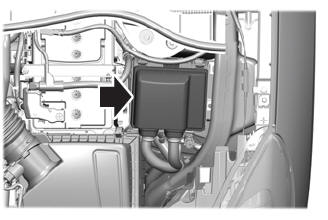
Under Hood Fuse Box
Locating the Under Hood Fuse Box
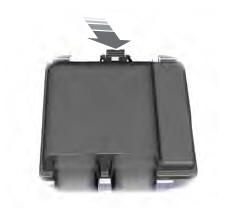
Accessing the Under Hood Fuse Box

Copyright © 2026 www.fordescape4.com