
Ford Escape 2020-2026 Owners Manual / SYNC™ 3 (If Equipped) / Using Voice Recognition / Text Message Voice Commands
Ford Escape: Using Voice Recognition / Text Message Voice Commands
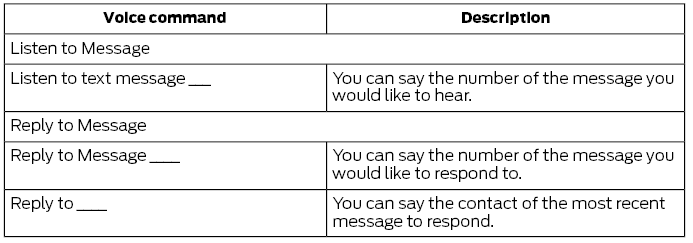
To access text message options, press the voice button and say:
 Phone Voice Commands
Pairing a Phone
You can use voice commands to connect
your Bluetooth enabled phone to the
system.
To pair your phone, press the voice button and when prompted, say:
Making Calls
___ is a dynamic listing, meaning that for
phone voice commands it can be the name
of the contact you wish to call or the digits
you want to dial...
 Navigation Voice Commands (If Equipped)
Setting a Destination
You can use any of the following
commands to set a destination or find a
point of interest.
___ is a dynamic listing, meaning that for
navigation voice commands it can be a POI
category or a major brand name, where
major brand name is a chain with more
than 20 locations
You can find an address, a point of interest (POI), or search for
points of interest
by category:
..
Other information:
Ford Escape 2020-2026 Service Manual: Removal and Installation - Body Control Module (BCM)
Special Tool(s) / General Equipment Interior Trim Remover Removal NOTE: Removal steps in this procedure may contain installation details. If installing a new BCM , connect a battery charger to the battery to make sure it is charged to maintain proper battery voltage. Refer to: Battery Charging (414-01 Battery, Mounting and Cables, General Procedures). NOTE: ..
Ford Escape 2020-2026 Owners Manual: How Do the Side Airbags Work
WARNING: Do not place objects or mount equipment on or near the airbag cover, on the side of the front or rear seatbacks, or in areas that may come into contact with a deploying airbag. Failure to follow these instructions may increase the risk of personal injury in the event of a crash. WARNING: Do not use accessory seat covers. The use of accessory seat covers may prevent the deployment..
Categories
- Manuals Home
- 4th Generation Ford Escape Owners Manual
- 4th Generation Ford Escape Service Manual
- Removal and Installation - All-Wheel Drive (AWD) Module - 1.5L EcoBoost (132kW/180PS) – I3 (Y1)/2.0L EcoBoost (177kW/240PS) – MI4
- Switching the Lane Keeping System On and Off. Switching the Lane Keeping System Mode. Alert Mode
- Rear View Camera
- New on site
- Most important about car
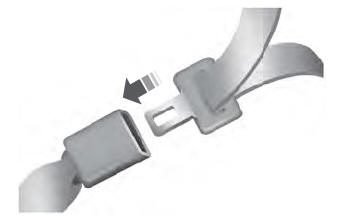
Fastening the Seatbelts

Copyright © 2026 www.fordescape4.com