Ford Escape: Body Closures / General Procedures - Rear Door Alignment
Inspection
NOTE:
Removal steps in this procedure may contain installation details.
NOTE:
LH side shown, RH side similar.
-
Inspect the body-to-rear door dimensions.
Adjustment
All alignments
-
Open the rear door.
-
Remove the fasteners and striker assembly.
Rear door in and out, up and down alignment
-
Loosen the fasteners to permit movement of the door.
Loosen:
:
2 turn(s)
-
Adjust the door as required.
-
Tighten the fasteners.
Torque:
35 lb.ft (48 Nm)
Rear door fore, aft and tilt alignment
-
Open the front door.
-
Remove the B-pillar trim panel
Refer to: B-Pillar Trim Panel (501-05 Interior Trim and Ornamentation, Removal and Installation).
-
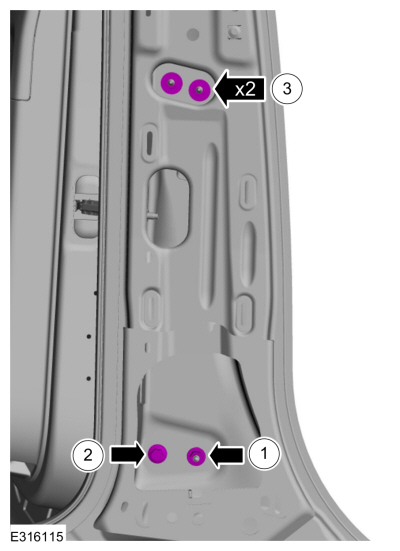
Loosen the fasteners to permit movement of the door.
Loosen:
:
2 turn(s)
-
Carefully close the rear door.
-
Loosen the fasteners to permit movement of the door.
Loosen:
:
2 turn(s)
-
Carefully close the door.
-
Adjust the door as required.
-
Carefully open the front door.
-
Carefully open the rear door.
-
Tighten the fasteners.
Torque:
22 lb.ft (30 Nm)
-
Tighten the fastener.
Torque:
22 lb.ft (30 Nm)
All alignments
-
Install the striker assembly.
Torque:
18 lb.ft (25 Nm)
-
Inspect the body-to-rear door dimensions.
-
Install the removed components.
Programming
NOTE:
This procedure clears and then sets new open and close end points in the RGTM memory.
Turn the ignition ON.
Using a scan tool perform the RGTM self test to complete power liftgate
initialization...
Special Tool(s) /
General Equipment
Door Lift
Removal
NOTE:
Removal steps in this procedure may contain installation details.
NOTE:
LH shown, RH similar...
Other information:
Creating a MyKey - Vehicles With: Push Button Start
Remove the mat covering the backup
location.
Remove the key blade from the
transmitter.
Place the passive key in the position
shown, with the buttons facing upward.
Switch the ignition on...
Follow these steps to set a preferred
charge time for a charging location.
Select Charge Preferences on the
Charge Settings screen.
Select Charge Time Setup on the Edit
Charge Preferences screen.
Select Add New Location on the
Charge Times screen...

.jpg)
.jpg)
.jpg)
.jpg)
.jpg)
.jpg)
.jpg)
.jpg)
.jpg)
.jpg)
.jpg)
.jpg)
.jpg)
.jpg)
 General Procedures - Power Liftgate Initialization
 Removal and Installation - Front Door