
Ford Escape 2020-2026 Service Manual / Body and Paint / Body and Paint
Ford Escape: Body and Paint / Body and Paint
- Body System - General Information
- Front End Body Panels
- Body Closures
- Interior Trim and Ornamentation
- Exterior Trim and Ornamentation
- Rear View Mirrors
- Front Seats
- Rear Seats
- Glass, Frames and Mechanisms
- Instrument Panel and Console
- Handles, Locks, Latches and Entry Systems
- Wipers and Washers
- Roof Opening Panel
- Bumpers
- Seatbelt Systems
- Supplemental Restraint System
- Body Repairs - General Information
- Body Repairs - Vehicle Specific Information and Tolerance Checks
- Front End Sheet Metal Repairs
- Roof Sheet Metal Repairs
- Side Panel Sheet Metal Repairs
- Rear End Sheet Metal Repairs
- Paint - General Information


Other information:
Ford Escape 2020-2026 Service Manual: Removal and Installation - Fuel Filler Door Assembly
Special Tool(s) / General Equipment Flat Headed Screw Driver Knife Removal NOTE: Removal steps in this procedure may contain installation details. NOTE: The fuel filler door assembly is damaged during the removal process and requires a new fuel filler door assembly installed. Disconnect the battery. Refer to: Battery Disconnect and Connect (414-01) . ..
Ford Escape 2020-2026 Owners Manual: Cooling System Capacity and Specification - 2.5L, Hybrid Electric Vehicle (HEV)/Plug-In Hybrid Electric Vehicle (PHEV)
Use coolant that meets the defined specification. If you do not use coolant that meets the defined specification, it could result in: Component damage that your vehicle warranty does not cover. Reduced vehicle performance. Capacities Materials ..
Categories
- Manuals Home
- 4th Generation Ford Escape Owners Manual
- 4th Generation Ford Escape Service Manual
- Plug-In Hybrid Electric Vehicle Drive Modes
- Symbols Glossary
- All-Wheel Drive
- New on site
- Most important about car
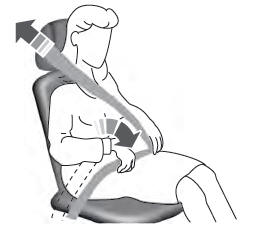
Adjusting the Seatbelts During Pregnancy
WARNING: Always ride and drive with your seatback upright and properly fasten your seatbelt. Fit the lap portion of the seatbelt snugly and low across the hips. Position the shoulder portion of the seatbelt across your chest. Pregnant women must follow this practice. See the following figure.

Copyright © 2026 www.fordescape4.com