
Ford Escape 2020-2026 Service Manual / Chassis
Ford Escape: Chassis
- Suspension
- Suspension System - General Information
- Front Suspension
- Rear Suspension
- Wheels and Tires
- Tire Pressure Monitoring System (TPMS)
- Driveline
- Brake System
- Brake System - General Information
- Front Disc Brake
- Rear Disc Brake
- Parking Brake and Actuation
- Hydraulic Brake Actuation
- Power Brake Actuation
- Anti-Lock Brake System (ABS) and Stability Control
- Steering System

 Suspension
..
Other information:
Ford Escape 2020-2026 Owners Manual: Opening and Closing the Flip Key. Removing the Key Blade
Opening Your Flip Key Press the round button on the remote control to extend the flip key. Note: Inspect the key blade for debris. Periodically clean with a brush. Closing Your Flip Key Press and hold the round button on the remote control to fold the key blade when not in use. Removing the Key Blade Push the release button on your passive key and pull the key blade out...
Ford Escape 2020-2026 Service Manual: Description and Operation - Pedestrian Alert System - System Operation and Component Description
System Operation System Diagram Item Description 1 PACM 2 PCM 3 IPC 4 Rear sounder 5 BCM 6 SOBDMC 7 Front sounder Network Message Charts Module Network Input Messages - PACM Broadcast Message Originating Module Message Purpose Factory ..
Categories
- Manuals Home
- 4th Generation Ford Escape Owners Manual
- 4th Generation Ford Escape Service Manual
- Opening and Closing the Hood
- Drive Modes
- Accessing the Trip Computer. Resetting the Trip Computer
- New on site
- Most important about car
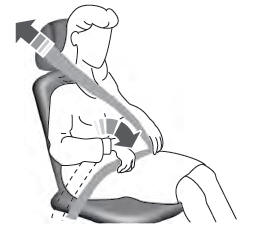
Adjusting the Seatbelts During Pregnancy
WARNING: Always ride and drive with your seatback upright and properly fasten your seatbelt. Fit the lap portion of the seatbelt snugly and low across the hips. Position the shoulder portion of the seatbelt across your chest. Pregnant women must follow this practice. See the following figure.

Copyright © 2026 www.fordescape4.com